
What the planner checks
The planner keeps every piece at its entered trim size. It compares upright and rotated uniform grids, two-zone arrangements made from upright and rotated rows or columns, and repeated four-piece pinwheels. Rotation means 90° only. Each candidate is built from explicit rectangular coordinates, including the entered spacing.
The largest count among these candidates is a feasible result. More complicated arrangements may fit additional pieces. The planner does not search every possible placement or optimise arbitrary shapes, grain direction, common-cut production, press grippers or cutting order.
An independent area bound divides usable sheet area by one bleed footprint, ignoring gaps. If a constructed plan reaches that integer bound, no further footprint can fit by area, so the count is proved for the stated model. Otherwise, the result says at least that many fit.
Why the worked example fits five
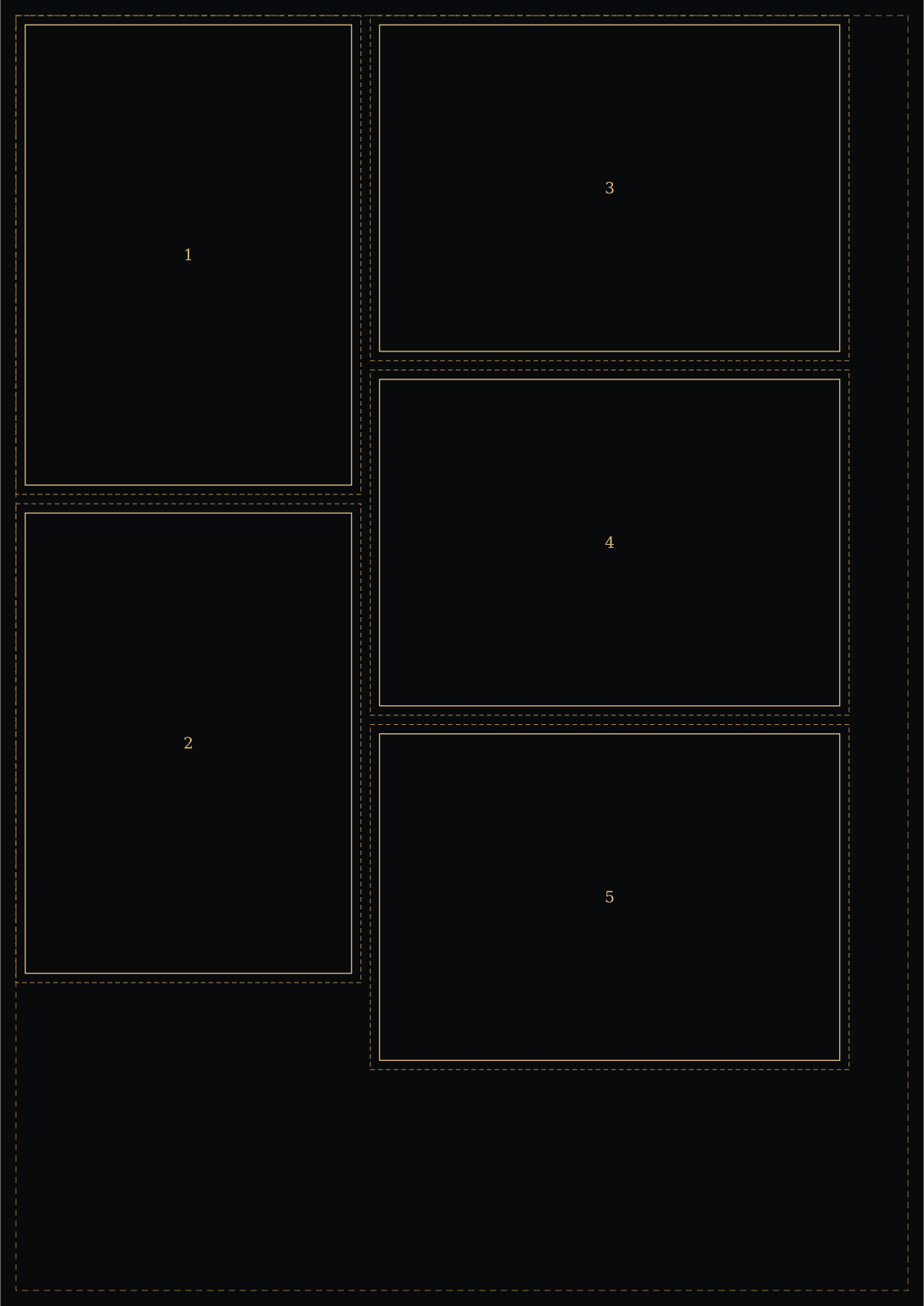
Nominal A3 is 297 × 420 mm. Reserving 5 mm at each edge leaves 287 × 410 mm. An A6 trim is 105 × 148 mm; adding 3 mm bleed per edge makes its footprint 111 × 154 mm.
One upright column holds two footprints. A neighbouring rotated column holds three. Their combined width is 111 + 3 + 154 = 268 mm. The taller column uses 3 × 111 + 2 × 3 = 339 mm. Both dimensions fit the usable sheet. Uniform arrangements find four or three under the same allowances.
Mixed rows also help other dimensions: on A3 with 5 mm margins, no bleed and 3 mm gaps, 85 × 55 mm cards fit in a checked 23-piece arrangement, compared with 21 in the best uniform grid. A separate 20 × 20 mm example fits four 12 × 8 mm rectangles in a pinwheel, reaching its area bound. These are particular checked cases, not universal guarantees.
Keep production allowances explicit
Bleed is added twice to each trim dimension: footprint width = trim width + 2 × bleed, with the same calculation for height. Usable sheet dimensions subtract the margin twice. The gap is then added only between neighbouring footprints. No allowance is silently reduced to reach a target.
The chosen 3 mm bleed is an example, not a requirement for every job. Confirm the printer’s specification, artwork safe area and any space for marks separately. Read how bleed, trim, gutter and margins differ before preparing artwork.
Use the exported plan as a measurement aid
The SVG keeps the physical sheet dimensions in millimetres and outlines both trim and bleed. It includes a 100 mm calibration line only when there is room in the top margin. The CSV lists coordinates from the sheet’s top-left corner, dimensions, rotation and the calculation method.
These files are layout references, not artwork or machine cutting instructions. Print the SVG at actual size, measure the calibration line when provided and check a finished-size test rectangle. Browser and printer settings can still resize output. Check actual-size printing before committing to a run. Detailed diagrams and downloads support up to 1000 placements; larger calculated counts are reported without a truncated export.
Worked guides
- How many A6 fit on A3? Compare nominal dimensions with a practical mixed arrangement.
- How many A6 fit on A4? See how independent bleed footprints change the count.
- A4 with 3 mm bleed: calculate the surrounding artwork footprint.
- Bleed, trim, gutter and sheet margins: identify each region before entering allowances.
Sources and reusable reference data
- ISO 216:2007 identifies the trimmed A-series standard. The paper size chart lists the nominal dimensions used here.
- Adobe’s A6 format reference publishes A-series dimensions.
- Adobe: set a print bleed explains extending artwork beyond the finished trim.
Placements and method comparisons are Paper & Scale’s own calculations from these nominal dimensions. The reference data and calculation specification provide reusable dimensions and a description of the model. Dimensions are not changed to accommodate a target quantity.