
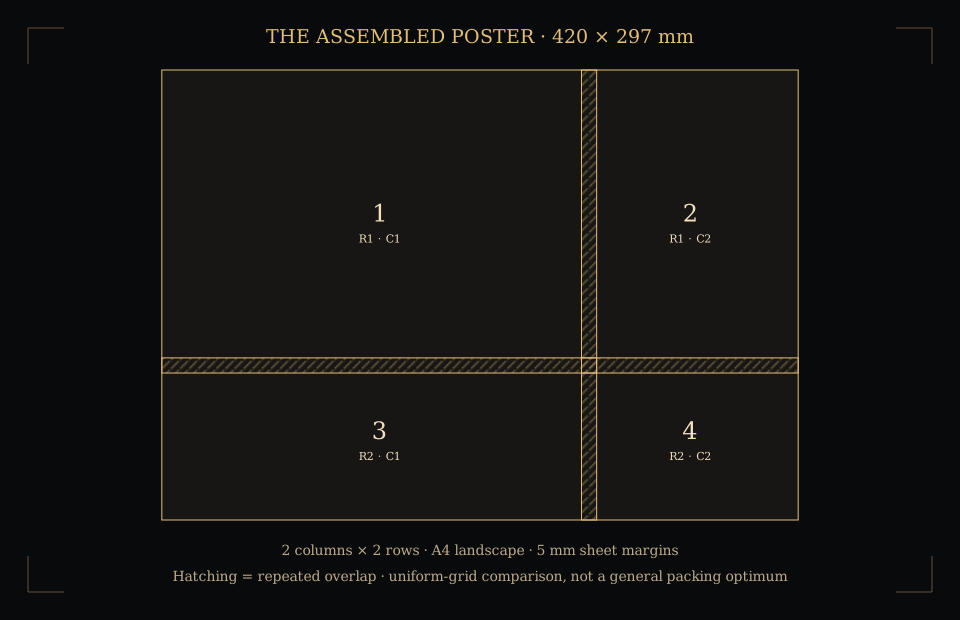
Why the worked example needs four sheets
A3 landscape is 420 × 297 mm. Landscape A4 is 297 × 210 mm. Reserving 5 mm on every sheet edge leaves 287 × 200 mm for artwork. A 10 mm overlap means the next tile starts 287 − 10 = 277 mm across, or 200 − 10 = 190 mm down.
Two columns cover 287 + 277 = 564 mm; two rows cover 200 + 190 = 390 mm. Both exceed the poster’s required dimensions, so a two-by-two construction covers it. Its last source rectangles are clipped at the poster’s boundary; the spare paper does not enlarge the artwork.
Portrait A4 has a 200 × 287 mm printable rectangle with these margins. It needs three columns and two rows, or six sheets. With no margins and no overlap, two portrait A4 sheets can cover nominal A3 landscape exactly. That zero-allowance arrangement is a different example, not a printer capability test.
The tiling calculation
- Printable area
- Subtract twice the assumed margin from each sheet dimension. For a sheet width W and equal margin m, printable width U = W − 2m. Do the same for height.
- Step between tiles
- The horizontal step is printable width minus overlap. The vertical step is printable height minus overlap. Both steps must remain positive.
- Columns and rows
- For source width P, use one column when P ≤ U. Otherwise, columns = 1 + ceil((P − U) ÷ (U − overlap)). Apply the same calculation to the height for rows. Sheet count = columns × rows.
- Orientation comparison
- Automatic orientation compares portrait and landscape uniform grids under the same margin and overlap assumptions. It does not rotate individual tiles, search mixed arrangements or prove a global minimum.
A geometry proof and an image PDF are different
The specimen uses authored lines, tile numbers and known dimensions. It lets you check coverage and assembly without supplying a file. It is not evidence that a particular printer reproduces those dimensions accurately.
When you choose an image, the requested poster size controls its physical placement. Keeping its proportions avoids stretching; changing dimensions with that option off can distort the picture. The PPI readout relates the image’s pixels to the complete poster size. A large export does not create additional photographic detail.
Read the image print checker for crop, border and resolution comparisons. Existing PDFs have their own page boxes and units; inspect those separately with the PDF page-box checker.
Print, trim and assemble
- Use paper and printer settings that honour the entered margin. Choose Actual size or 100% for the exported PDF.
- Print a small proof and measure a known dimension. A printer’s scaling and feed accuracy are separate from this plan’s geometry.
- Keep the rows and columns in order. Align matching artwork through the repeated overlap before trimming or attaching sheets.
- Check the whole assembly before its final trim. The empty outer portion of a last sheet is spare paper, not part of the poster.
Cut guides and labels are placed in the reserved margins only when at least 4 mm is available. With smaller margins, the export omits them rather than printing them over the artwork. Zero overlap leaves no repeated strip to help alignment.
Adobe’s poster-printing documentation describes tile scale, overlap, cut marks and labels. This tool calculates its own uniform-grid construction and exports sheets for printing at 100%; it does not control a printer driver or reproduce every application’s Poster settings.
Local processing, limits and sources
Your selected image is processed in this browser and is not uploaded to a server. The exporter downloads on first use and runs separately from the page’s controls. PDF library licence notices. Export stops after 30 seconds. Clearing the image returns to the authored specimen; copying a plan link shares dimensions and allowances only.
The tool accepts PNG, JPEG and WebP images up to 20 MiB and 12 million pixels. The assembled width and height must each be between 0.001 and 5,000 mm, and a plan is limited to 100 sheets. These are browser-processing limits, not recommended poster sizes or promises about available memory.
Paper dimensions use the site’s published nominal reference. A4 is 210 × 297 mm and A3 is 297 × 420 mm; US Letter is exactly 8.5 × 11 inches, or 215.9 × 279.4 mm. Margins are user-entered assumptions. The rectangles, original specimen and tiling formulas are Paper & Scale’s authored geometry, not physical printer measurements.