
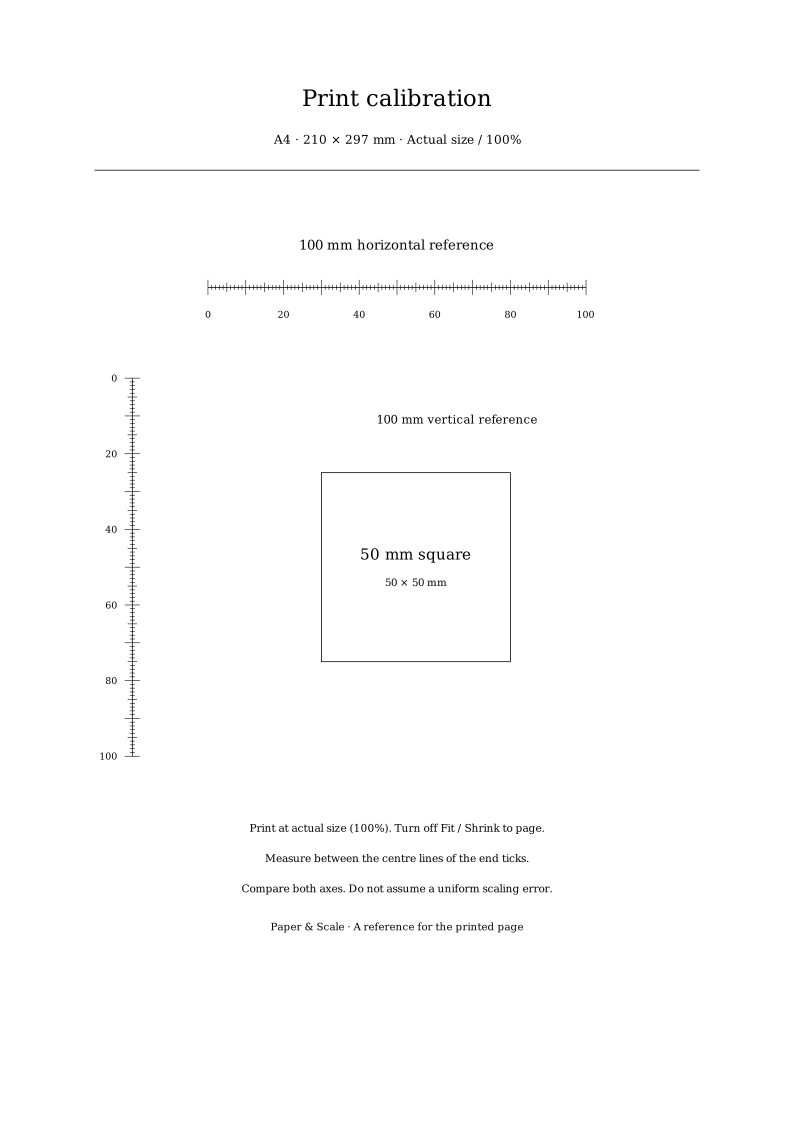
How to print the reference at actual size
- Download the file for the paper actually loaded in the printer. A4 and US Letter are different dimensions.
- Open the PDF in a PDF reader, or the SVG in an application that can print it at its declared physical size. Check that the selected paper matches the file.
- Choose Actual size or 100%. Turn off Fit, Shrink to page and other automatic scaling. Check the print preview.
- Print one copy. Measure the horizontal and vertical 100 mm references between the centre lines of the end ticks, then check the 50 mm square.
- Enter the measured gauge lengths above. Make a second measured test before relying on any correction.
See the actual-size printing guide for the difference between 100% and Fit. These files do not read printer capabilities or establish its non-printable border.
The error and correction formulas
For each 100 mm reference, error in mm = measured length − 100. A negative answer means the print is shorter; a positive answer means it is longer. The percentage error is 100 × (measured length ÷ 100 − 1).
The relative correction factor is 100 ÷ measured length. Multiply the print scale that produced the test by that factor. If the original setting was 100%, a 98 mm result suggests a next trial at 100 × 100 ÷ 98 = 102.0408…%. A 102 mm result suggests 98.0392…%.
This inverse relationship matters: a print that is 2% too short does not have an exact correction of 102%. The displayed percentage is calculated from the measured ratio. It is a starting point for another test, not an automatic printer adjustment.
When the two axes disagree
If one gauge measures 98 mm and the other 100 mm, their required corrections differ. A single uniform scale cannot make both exactly 100 mm. Remeasure carefully and repeat the test before attributing the difference to the device.
Ruler precision, reading the outside of a thick line, paper movement and application settings can affect a measurement. This tool reports the geometry implied by the two entered values; it cannot identify the physical cause. Avoid stretching artwork independently along each axis unless that change is intentional and supported by the workflow.
What is exact in these files?
The SVG declares an A4 sheet as 210 × 297 mm, A3 as 297 × 420 mm, and US Letter as 215.9 × 279.4 mm. Its gauge centre-line lengths are 100 mm and its reference square is 50 × 50 mm. One inch is exactly 25.4 mm, so Letter’s dimensions correspond to 8.5 × 11 inches.
Those are document dimensions, not a claim about a tested printer. The artwork contains no external images or fonts and uses black marks on a white background. Actual printed dimensions still depend on the application, driver, printer and paper. A ruler check closes that gap.
Use the paper size chart to confirm stock, the print scale calculator for deliberate format changes, and the sheet layout planner when arranging finished pieces.
Sources and method
- ISO 216:2007 identifies the trimmed A-series paper standard.
- Adobe: PDF page sizing and scaling explains Actual size, Fit and custom scale settings.
The calibration artwork and arithmetic are Paper & Scale’s own generated references. They have not been presented as physical press or printer test results.