
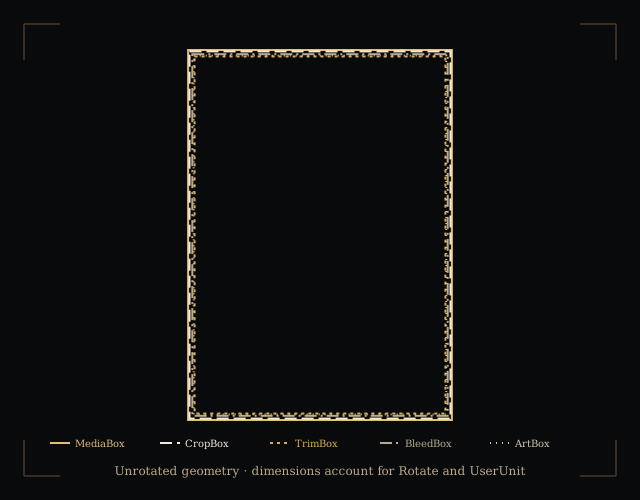
Worked example: A4 trim with 3 mm bleed
This is a synthetic mathematical specimen, not a physically printed test. Its MediaBox and CropBox are 216 × 303 mm. The TrimBox starts 3 mm inward from each edge, giving a finished 210 × 297 mm A4 rectangle. The BleedBox equals the MediaBox. No ArtBox is declared, so it defaults to CropBox.
Printing the whole MediaBox at 100% asks for 216 × 303 mm. Fitting that rectangle to a full A4 sheet uses min(210 ÷ 216, 297 ÷ 303) × 100 = 97.2222…%. The finished trim is reduced too. Selecting the A4 TrimBox instead gives 100% for this mathematical comparison, but an application may select a different box or apply its own scaling.
A PDF can therefore contain an A4 finished size and still describe a larger page. Check the PDF’s boxes alongside the application’s preview and a measured print calibration sheet.
Inspect the original authored specimens yourself: nominal A4 PDF, A4 trim with 3 mm bleed PDF and rotated PDF with UserUnit 2. These are synthetic examples with stated geometry, not printer measurements.
What each box tells you
- MediaBox
- The page’s physical medium boundary in PDF coordinates. It is required and can include bleed or printer’s marks around the finished piece.
- CropBox
- The clipping boundary used when a page is displayed or printed. When absent, it defaults to MediaBox. It does not by itself establish the finished trim.
- TrimBox
- The intended finished page after trimming. When absent, it defaults to CropBox; that default is not evidence that trim was explicitly set.
- BleedBox
- The production clipping boundary that can include extra material around the trim. When absent, it defaults to CropBox. A larger box does not prove that artwork fills it.
- ArtBox
- The intended extent of meaningful page content. When absent, it defaults to CropBox. This checker does not inspect the content inside it.
Coordinates, rotation and physical size
For a rectangle [x₁, y₁, x₂, y₂], unrotated width is |x₂ − x₁| and height is |y₂ − y₁|. The origin may be non-zero or negative. Reversed coordinate pairs are normalised and reported. Raw values stay visible for diagnosis.
Millimetres = coordinate distance × UserUnit × 25.4 ÷ 72. Inches use the same distance × UserUnit ÷ 72. UserUnit defaults to 1 and must be greater than zero and no greater than 75,000. It is not inherited. Rotate defaults to 0, may be inherited and must be a multiple of 90 degrees. Rotations of 90° or 270° swap the reported width and height.
The effective rectangle is the declared or default rectangle intersected with MediaBox. A box outside MediaBox, a box outside CropBox or a TrimBox outside BleedBox receives an observation. An invalid MediaBox or invalid unit/rotation leaves affected dimensions unavailable, rather than silently substituting a paper size.
For a chosen target sheet and equal margin m, available width = sheet width − 2m and available height = sheet height − 2m. Fit = min(available width ÷ box width, available height ÷ box height). The calculation preserves orientation and allows enlargement; it does not emulate every application’s “Fit” setting.
Scope, privacy and sources
This checker reads structural page geometry with pdf-lib. Reader library licence notices. File selection is local. PDF bytes are transferred to a browser worker, which is terminated after reading, when cleared or after the 25-second limit. The selected file is not uploaded, embedded in a viewer or passed to an external PDF service.
It does not inspect ink coverage, image resolution, fonts, colour separations, transparency, marks, annotations, content clipping or PDF/X compliance. It does not determine a printer’s usable area, change a file or certify readiness for a press.
Adobe’s explanation of PDF cropping and page boxes distinguishes crop, trim, bleed and art boundaries. The PDF Association’s specification archive provides the PDF specifications that define page dictionary inheritance, defaults, UserUnit and rotation. The synthetic example and fit calculations are Paper & Scale’s own geometry.