
Why an A4 PDF can print smaller than A4
A finished A4 piece measures 210 × 297 mm. A document with 3 mm bleed on every edge needs an outer rectangle of 216 × 303 mm. If the application fits that whole outer rectangle onto A4, it reduces the artwork, including the finished A4 trim.
The fit is 100 × min(210 ÷ 216, 297 ÷ 303) = 97.2222…%, before any printer margins. The intended 210 mm trim width becomes about 204.167 mm. This is a geometry example, not a measured printer result.
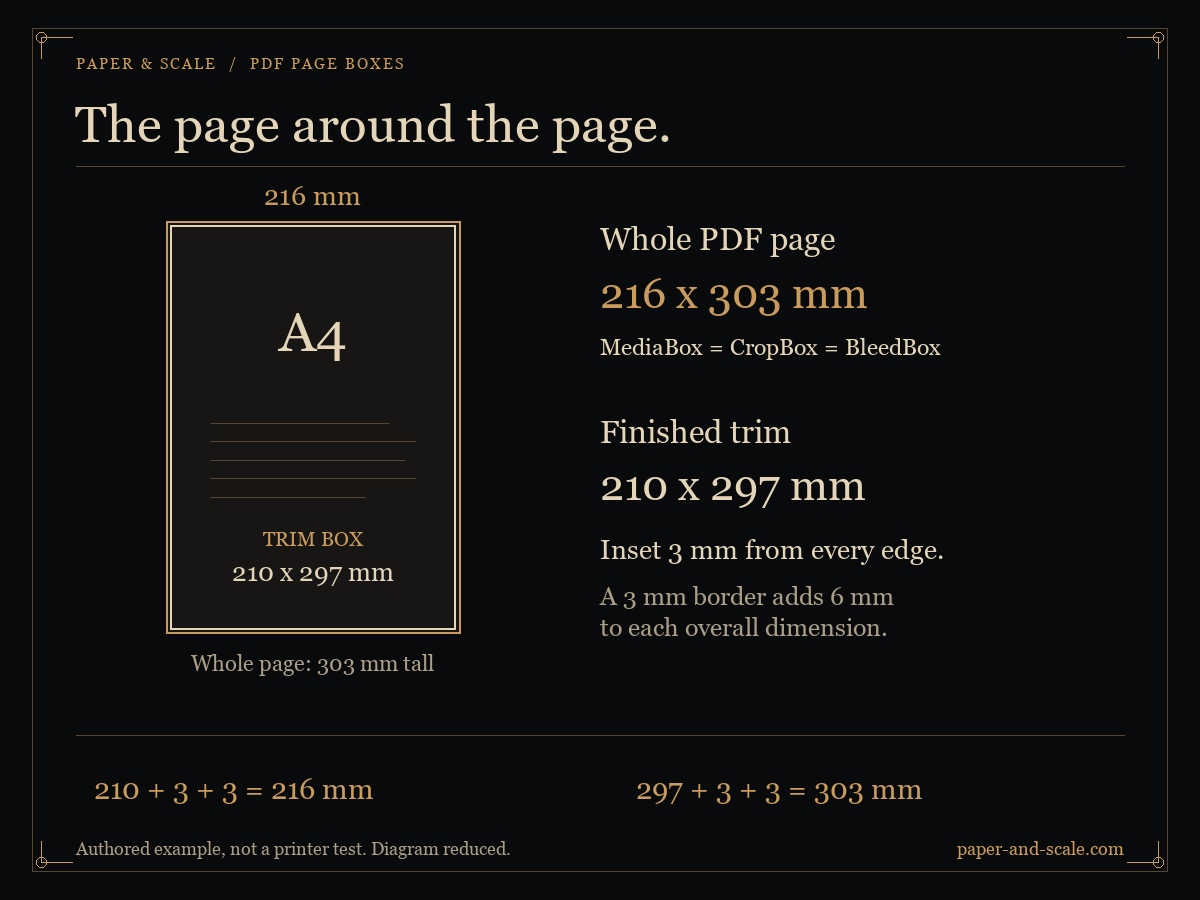
The five PDF page boxes
| Box | Purpose | When absent |
|---|---|---|
| MediaBox | The whole physical medium boundary in PDF coordinates | Required; may be inherited from the page tree |
| CropBox | The region normally displayed or printed | MediaBox; may also be inherited |
| TrimBox | The intended finished page after trimming | CropBox |
| BleedBox | The production clipping region that can include bleed | CropBox |
| ArtBox | The extent of meaningful content as declared by the author | CropBox |
A defaulted TrimBox is not evidence of an explicitly specified finished size. A BleedBox larger than TrimBox is not evidence that colour extends far enough, or that important text is safe from the cutter. Those require inspecting the actual artwork and the print provider’s specification.
Three files you can inspect
These are original, synthetic teaching files authored by Paper & Scale. Their dimensions are constructed in PDF coordinates. They are not certified PDF/X files or results from physical printing.
Plain A4, with default boxes
MediaBox is 210 × 297 mm. CropBox, TrimBox, BleedBox and ArtBox are absent, so their effective values fall back to the full page. Rotate is 0° and UserUnit defaults to 1.
Download the plain A4 PDFA4 trim with 3 mm bleed
MediaBox, CropBox and BleedBox are 216 × 303 mm. TrimBox begins at [3, 3] mm and ends at [213, 300] mm, leaving 210 × 297 mm. ArtBox defaults to CropBox. Fitting the whole page to A4 gives 97.2222…%.
Download the A4 bleed specimenRotation, an offset origin and UserUnit
MediaBox is [0, 0, 300, 400] raw units. CropBox is [10, 20, 290, 380]. Rotate is 90° and UserUnit is 2. The oriented MediaBox measures approximately 282.222 × 211.667 mm; CropBox measures 254 × 197.556 mm. Multiplying the raw distances by 25.4 ÷ 72 alone would miss the doubled unit size.
Download the rotation and units specimen
Open a specimen in the local PDF checker to compare raw coordinates, defaults, inherited values and physical dimensions. Your selected file stays in your browser.
Convert coordinates into a physical size
For [x₁, y₁, x₂, y₂], the coordinate distances are |x₂ − x₁| and |y₂ − y₁|. A non-zero origin changes the location, not those distances.
Millimetres = coordinate distance × UserUnit × 25.4 ÷ 72
UserUnit defaults to 1. A rotation of 90° or 270° exchanges the displayed width and height. Crop, trim, bleed and art boundaries that extend beyond MediaBox are clipped to the medium for the effective dimensions reported by this checker. Raw values remain visible so that an odd declaration can be investigated.
Which box does a print dialogue use?
Do not assume that every application chooses the same box. Its display, print settings, crop options and printer driver can change the result. Confirm the reported PDF size and preview, then choose the intended sheet, orientation and scaling setting.
Actual size requests 100% and can clip content that lies outside the printable area. Fit can reduce an already matching nominal paper size because of printer margins. A borderless mode can add its own enlargement. For critical work, print a known gauge and measure it.
Watch the 50-second illustrated demonstration, or use the print calibration reference for the physical check.
Sources and limits
The boundary definitions, fallback values and page dictionary rules follow the PDF specifications in the PDF Association archive. Adobe’s page cropping guide explains crop, art, trim and bleed controls; its page-size printing guide describes Fit and Actual size.
The specimens, diagram, conversion arithmetic and tutorial are Paper & Scale’s original teaching material. Geometry alone cannot establish colour accuracy, image detail, font embedding, bleed coverage or press readiness.